Installation and Configuration
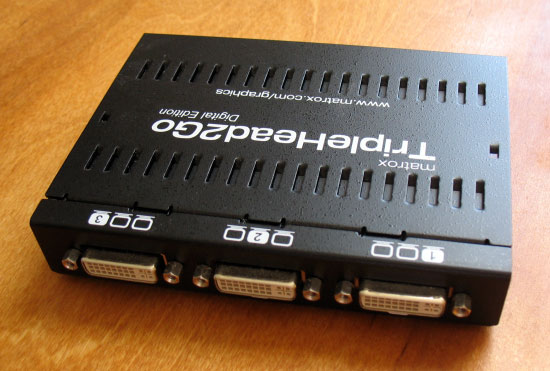
Installing the Digital TripleHead2Go should be a simple procedure. Turn off your computer, connect the Digital TripleHead2Go to your video card, connect your monitors to the TripleHead2Go, connect the USB cable, turn the computer on, and install the software from the CD. Unfortunately I had all sorts of problems with this process, including screens that would display nothing and triplehead desktops that would display for five seconds before my computer performed an “uncommanded” reboot. Eventually I rebooted multiple times and moved my USB cable from a powered 7-port hub to a motherboard port, and the problems went away. However, Matrox states that the device must be connected to a powered port, and both of these ports are powered, so the hub should not have caused a problem.
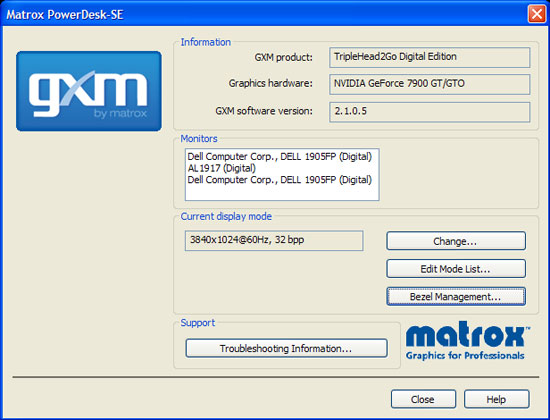
Once you are up and running with three monitors connected, you can use the included PowerDesk SE software to control the device. I tested the Digital TripleHead2Go using Dell 1905FP 19” LCD monitors for the left and right screens and an Acer AL1917 19” LCD monitor in the center. All monitors have a 1280×1024 native resolution. PowerDesk SE has been revised for use with the Digital TripleHead2Go and the changes are impressive. A new module called “GXM” (graphics expansion module) tells you information about your hardware, lets you edit the available modes (resolutions and refresh rates), and configure the bezel management feature.
Compatibility
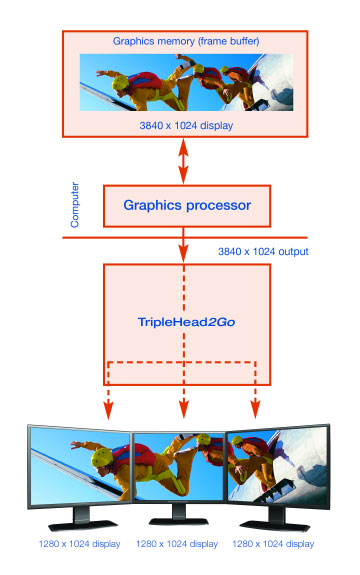
To use the Digital TripleHead2Go, you need Windows 2000, XP, or Vista (98 is not supported), as well as a GPU that supports proper triplehead output. Matrox provides an excellent web-based utility that will inform you if your particular hardware is capable. Remember that any triplehead output is rendering three times as many pixels as a standard single screen, and your system must be capable of handling the additional load. It is a good idea to use a high-end GPU, no matter the generation, to drive the TripleHead2Go and its attached displays. When comparing benchmarks, 3840×1024 has about the same number of pixels as a single 2560×1600 display. The following GPUs will provide a good triplehead experience:
- NVIDIA 6800 series
- NVIDIA 7900 series
- NVIDIA 8800 series
- ATI HD2900 series
Obviously, the more powerful the GPU, the better your hardware can handle the demands of triplehead gaming. Note that the ATI X1000 series and below is not capable of displaying the higher triplehead resolutions, so if you wish to use ATI products you must have an “HD” series card, currently the newest in the ATI line; the high-end HD2900 is recommended because of its capabilities. SLI and Crossfire applications show benefit when used to drive high-resolution triplehead displays, but they are not necessary.
Related Posts:
Related posts:
 Matrox TripleHead2Go
 Matrox TripleHead2Go Digital Edition
 Page 2
Matrox TripleHead2Go Digital Edition Page 4
Matrox TripleHead2Go Digital Edition Page 5
Matrox TripleHead2Go Digital Edition Page 6
Matrox TripleHead2Go Digital Edition
Matrox TripleHead2Go Digital Edition Page 2
Matrox TripleHead2Go Digital Edition Page 4
Matrox TripleHead2Go Digital Edition Page 5
Matrox TripleHead2Go Digital Edition Page 6
 Matrox TripleHead2Go DisplayPort Edition
Matrox TripleHead2Go Page 2
Matrox TripleHead2Go DisplayPort Edition
Matrox TripleHead2Go Page 2