Controls Options
Now lets turn to the controllers section. Settings? You want controller settings? You got ’em. DCS: Black Shark has a huge amount of options and settings available. But as is the case with other parts of the sim, the scaleability can be lost in the multitude of available options.
For example, on one of our test computers we plugged in a vintage 8-button Microsoft Sidewinder joystick. The controller setup not only found the best options for the 8-button functions, but when you clicked on each button, the controller interface jumped to the associated action line and highlighted it in blue. Nice! If we then wanted to modify that function, we could then do so.
“So how do I assign key commands and axis assignments to my HOTAS?” you may ask. Here’s how, in a generic way, and it’s not difficult. First, I would suggest that you fly in either the simulation or game mode, your preference, and see what works. It may be that the axis assignments are just fine and so you can move on to other things. Or maybe two of your three HOTAS are working and one’s not. Just establish what you have before moving on.
Let’s look at a simple example of changing axis assignments.
Go to your Options menu, then Controls tab. Up in the left corner is a drop down menu where you have to decide whether these changes apply to the Simulation (Real) mode, or Game mode. Do that, then move to the next drop down list on the right and open that. You’ll see a wide range of choices, but in this example, we’re doing Axis Commands, so click that.

Now, click on the axis you want to change: Cyclic pitch, cyclic roll, collective, rudder.

Click the Clear button. That clears out the previous assignment. If you have multiple assignments on the same axis, clear them all out.
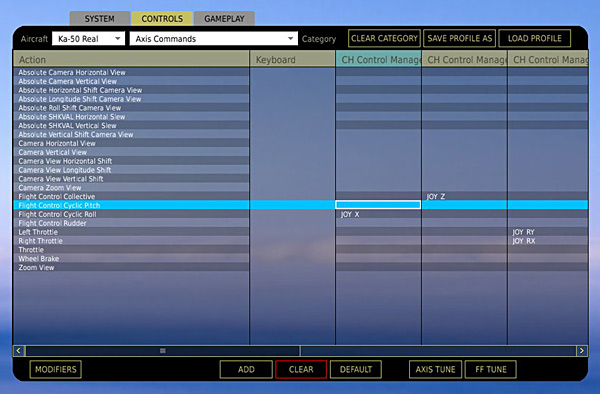
You now have an un-assigned axis.

Click the Add button, or double click the axis to be assigned. You’ll get the Add Assignment Panel. Click in the Key, Button box and move the controller you want assigned in the axis you want it assigned to.

For example, if you’re doing cyclic pitch, move your joystick front and back. The game should now recognize what you want. Remove any modifiers. Do the same thing for collective and rudder if you need to. Click the OK button at the bottom and you’re done.

All the other commands and assignments are done with the same procedure.
Always a part of the flight sim world is NaturalPoint’s TrackIR™ technology. Videos that Chris “BeachAV8R” Frishmuth produced earlier this year demonstrate it’s capabilities. As with nearly every other flight sim, the 6 DoF capability adds to the immersion significantly. Take a look at the YouTube video from Chris’ 3rd report.
Important! Users need to be sure that their TrackIR’s are updated to the latest drivers. At this writing, the latest version of the drivers is v4.1.036. You can download the drivers from here.
Related Posts:

Related posts:
 DCS: Black Shark – English Version Part 5 Page 5
DCS: Black Shark – English Version Part 5 Page 2
DCS: Black Shark – English Version Part 5 Page 3
DCS: Black Shark – English Version Part 5 Page 5
DCS: Black Shark – English Version Part 5 Page 2
DCS: Black Shark – English Version Part 5 Page 3
 DCS: Black Shark English Version – Part 1 Page 2
DCS: Black Shark English Version – Part 1 Page 5
DCS: Black Shark English Version – Part 1 Page 7
DCS: Black Shark English Version – Part 1 Page 2
DCS: Black Shark English Version – Part 1 Page 5
DCS: Black Shark English Version – Part 1 Page 7
 DCS: Black Shark English Version – Part 2 Page 5
DCS: Black Shark English Version – Part 5
DCS: Black Shark English Version – Part 2 Page 5
DCS: Black Shark English Version – Part 5