 Options Settings
My first stop is at the Options screen where I select the operating settings for my controllers and my graphics and sound cards. The Options functions are not finalized yet, and we can expect more features to be added to what I had to choose from. The rotary knob in the upper right lets you select the type of changes to be made. These include Input (controller settings), Audio (the quality of the in-game voices is excellent), Difficulty (where you choose weapons and avionics characteristics, survivability, object labeling, etc), Graphics, and Cockpit. Input, Graphics, and Cockpit merit special attention.
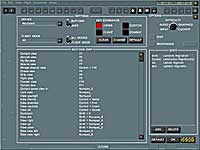
 Input is where you tailor your game controllers (keyboard, stick, throttle, and rudder). If you have a programmable HOTAS, you will find more options than you can literally shake a stick at! The next screenshot is but a small example of some of your choices. This wide range of assignment options allows you to make the game as complex as you want as far as the operation of your controller is concerned.
The game is graphically complex, but the Graphics setting allows you to tailor the game to the capabilities of your system. I found that the range of choices easy to use and noticeable in their effect. You should find that changes in graphics settings affect primarily frame rate and the range from your aircraft that specific ground objects become visible. I had no problem finding a setting that gave me a smooth frame rate and yet kept the “eye candy” at an acceptable level.  Here is the screen that I worked with…expect additional features in the gold release.
The Cockpit screen allows you to spice up your internal views with nifty additions such as mirrors and cockpit reflections. There is one feature here that I want to mention…the Angle Of View option. Use this control to widen your peripheral vision in the forward internal view. The game is preset at 60 degrees, but I found a wider view to significantly improve my sense of “visibility” when maneuvering. You can select angles in excess of 120 degrees but in doing so the HUD moves forward and becomes harder to read. I found the wide view to be great for maneuvering, but needed the closer in view for weapons delivery work.
 |
 |
 |
| Cockpit Screen |
60 Degrees Default View |
120 Degrees Wide Angle Of View |