Image Quality
As a derivative of the R420 architecture, the X700s also support programmable multisampling modes of anti-aliasing. A sparse sampling pattern is defaulted to when the feature is enabled via ATI’s driver panel, identical to that of the X800s. And temporal AA, the changing of the sampling pattern used each frame, is also supported by the X700s. Anti-aliasing performance is tested using IL-2: Forgotten Battles-Aces’ Black Death track at the resolution of 1024×768.
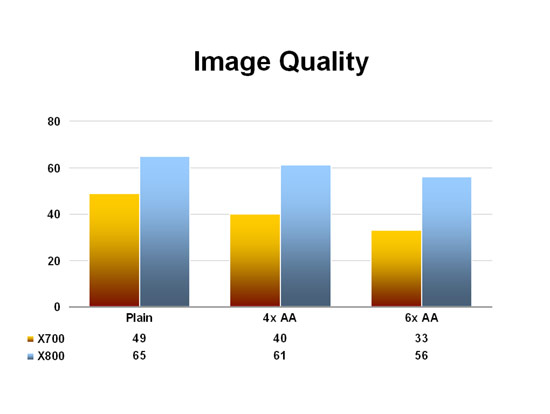
While the X800 loses less than 10% once 4x AA was enabled, the X700 lost slightly over 20%, a result most likely caused by the memory bandwidth difference between the two boards. This trend continues with 6x also, with the slower board losing 30% of its performance, a much worse score than what the X800 exhibited. Gamers interested in using anti-aliasing may need to bear in mind the greatly reduced bandwidth mainstream cards such as the X700 ship with.
As explained in the X800 XT review, the ATI’s A.I. option enables an adaptive filtering algorithm that examines the scene being rendered and attempts to filter with a emphasis on performance. When set at low A.I. enables all title-specific optimizations that ATI has built into the Catalyst drivers, while at high the adaptive filtering is applied more aggressively. Both A.I. and anisotropic filtering are tested below at 1024×768, again using IL-2: Forgotten Battles-Aces’ Black Death track.
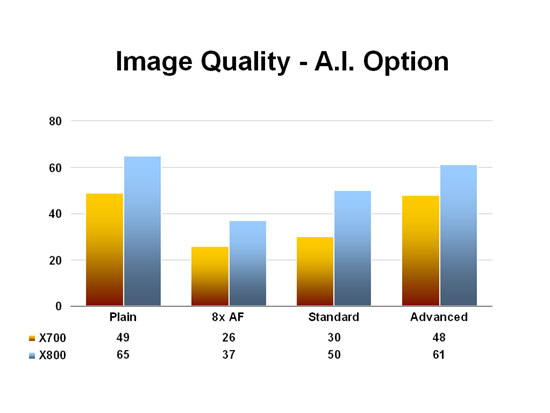
As usual IL-2: FB-Aces sees a tremendous frame rate drop with anisotropic filtering, with the X700 losing almost 50% of its performance. Enabling A.I. at its standard setting (formerly low), however, lends a much higher boost for the X800 than the X700, a peculiar situation since changing the setting to advanced (formerly high) brings the frame rate back up consistent between the two boards.
Gallery
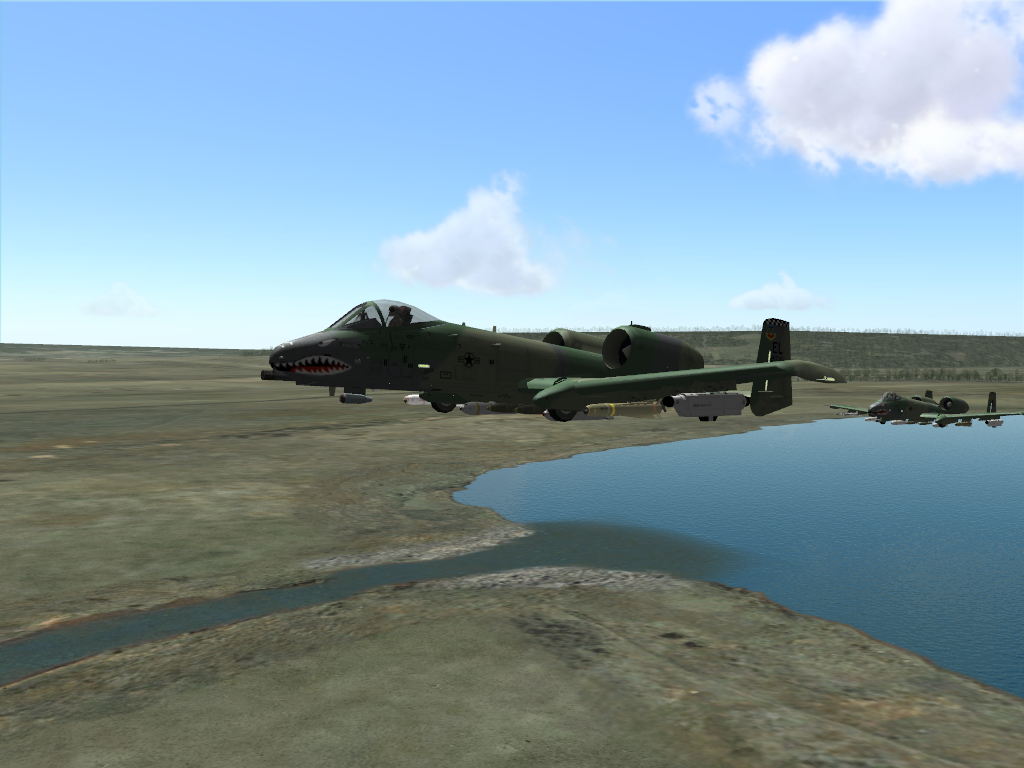
All screenshots were captured at 1024×768 with 4x AA and 8x AF enabled using the licensed version of Fraps 2.3.3. Images are saved in the png format.
 |
 |
| P-38 from IL-2:FB – AEP (760 kb) |
A-10 from LOMAC (624 kb) |
Conclusion
Using the latest Catalyst driver version, the X700 rendered every game thrown its way without issue and offered image quality identical to that of the high-end X800. Yet as a PCI Express only part, the X700 XT is clearly intended by ATI to appeal to OEMs seeking a discrete add-in graphics board that is robust in its feature set and performance since the new bus hasn’t had sufficient time to saturate the home market. Moreover, SimHQ would be somewhat remiss if we failed to mention that the noise level generated by the card’s fan is most likely to be unacceptable to the typical home system builder, as its speed stepping is engaged almost immediately the moment a game is launched; the X700 is inarguably the loudest graphics card this reviewer has ever heard. ATI has perhaps been too aggressive with the clock speeds for the X700 XTs, and it will be interesting to see if board partners are able to improve the cooling solution for their offerings.
A recurring trend in the graphics market is that of current mainstream cards giving performance equal to, if not greater than, the previous year’s high-end offerings, and the Radeon X700 XT certainly upholds that pattern. ATI has succeeded in essentially retiring the 9700 and 9800s from last year with their X700 lineup, as these new cards give all the features of the R420 architecture while boasting higher fill- and vertex rates thanks to the high clock speeds of the graphics chips. And for a board that comes with a suggested price of $199, less than half the $450 price tag of the X800 XT, the X700 XT exhibited remarkably good frame rates throughout most of SimHQ’s current test suite — so long as the prospective buyer isn’t particularly keen on combining anti-aliasing or anisotropic filtering and higher resolutions. Those looking to upgrade their aging graphics cards from years gone by without the financial burden of a second home mortgage should give the Radeon X700s consideration.
Download a pdf of this article here (386 kb).
The “How SimHQ Tests” page is here.
The page includes our test criteria and links to the new Benchmark Suite.